|
Sandberg Micro Bluetooth 4.0 Dongle
[Item no. 133-75] Rev. 15.06.13
- Insert the adapter into a USB port on your computer.
- Make sure your Bluetooth device is in pairing mode.
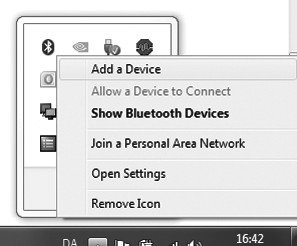
- Click the Bluetooth icon on your task bar, and select “Add device”.
- Find your device in the list and click “Next”.
- Depending on your device, you may need to confirm the code that appears on your screen. Follow the on-screen instructions.
|
|