DISCLAIMER: IPx4 splashproof case, protecting against water splashes. Do not immerse in water.
1 Introduction
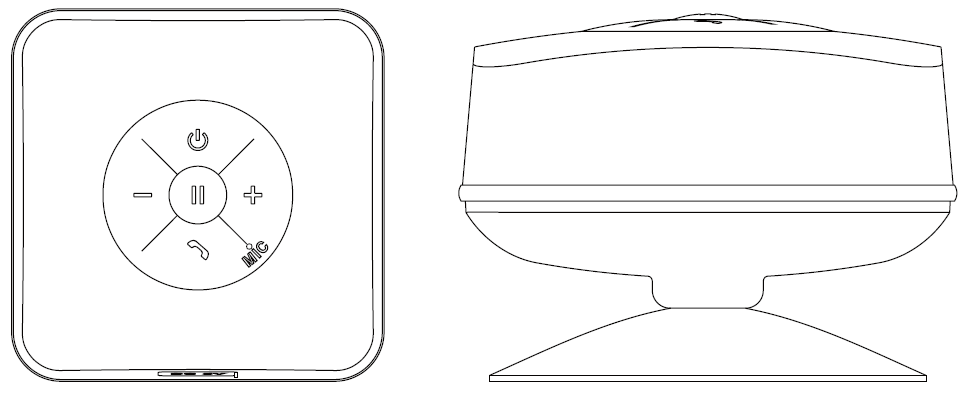
Sandberg Shower Bluetooth Speaker is a smart waterproof Bluetooth speaker designed for shower mount by means of a powerful suction disc. Enjoy the music from your mobile phone wirelessly while you are taking a shower - or remove the suction disc and bring the speaker wherever you want.
2 First use and charging
Before you use the speaker for the first time, the internal battery must be charged. Connect the enclosed USB cable between the speaker’s small Micro USB connector and a USB port, either on a computer or on a USB AC mains adapter.
While the battery is charging, the LED in the middle of the speaker displays a red light. When charging is complete the LED goes out.
NB: The LED flashes when the battery is running out of power.
3 Functions
Function |
Button |
Method |
| Turn speaker on/off |
|
Hold the button down for 3 seconds until a blue light flashes and a voice is heard. You also need to hold the button down for 3 seconds to turn off the speaker. |
| Pairing mode |
|
Search for Bluetooth devices on the Bluetooth device to which the speaker is to be connected. See the documentation for this device to find out how this is done. The speaker is found under the name “Sandberg 450-07”. |
| Play/Pause |
|
During playback, press once to pause the music. Press again to continue playback. |
| Next track |
+ |
Hold the button until the track changes to the next track on your playlist. |
| Previous track |
- |
Hold the button until the track changes to the previous track on your playlist. |
| Volume up |
+ |
Press once to increase the volume gradually. The volume increases each time you press the button. |
| Volume down |
- |
Press once to lower the volume gradually. The volume goes down each time you press the button. |
| Answer call |
|
Press the button once. |
4 Troubleshooting
4.1 No sound
- Check that the speaker’s built-in battery is charged or that the speaker is connected to a power supply via the enclosed USB cable. See section 2.
- Check that the speaker is correctly paired to the Bluetooth audio source. See section 3 and if necessary the manual for the Bluetooth device you are connecting.
If you need further help or assistance with your Sandberg product, you can visit the website http://helpdesk.sandberg.it.
Have fun with your Sandberg Shower Bluetooth Speaker! |